





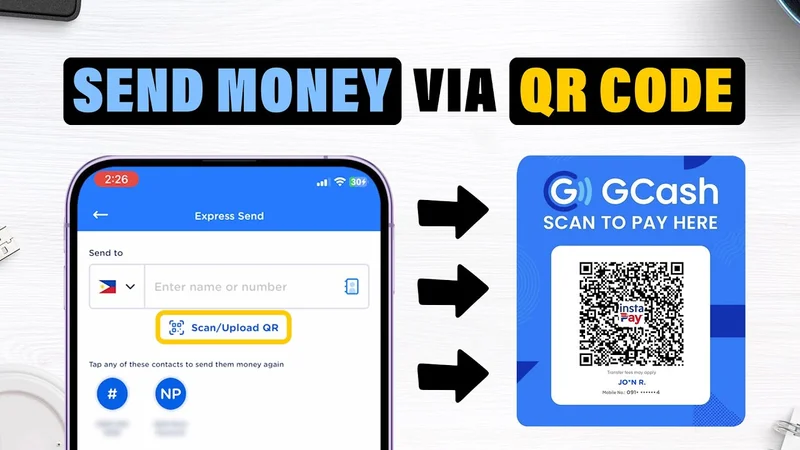
Depositing via GCash at Jilino1 is fast, secure, and straightforward. By utilizing standard QR Ph interoperability, transactions clear automatically without manual staff intervention. This guide walks you through every screen tap, explains where to locate your reference number, and details how to avoid common deposit errors.
Preparation: Ensuring Your GCash App is Ready
Before initiating a cash-in, ensure your personal GCash mobile app is updated to the latest version and possesses sufficient balance. While basic (unverified) GCash accounts can execute outbound QR payments up to monthly wallet caps, having a fully verified GCash profile guarantees smoother higher-denomination transfers.
The QR Ph Scanning Method: The Fastest Deposit Route
The premier deposit method on Jilino1 is Dynamic QR Ph. Unlike static QR codes where you must manually type payment amounts, a dynamic QR code embeds your exact deposit amount and unique player transaction ID into the barcode. When scanned inside GCash, the amount populates automatically, eliminating any chance of typo errors.
Locating Your 13-Digit GCash Reference Number
Upon completing any GCash transfer, GCash displays an in-app receipt and sends an official SMS from 'GCash'. Both contain a unique 13-digit Reference ID (e.g., '1002345678901'). Always save a screenshot of this receipt. In the rare event of telco network delays, our 24/7 customer support team can use this reference number to locate and credit your balance manually within 60 seconds.
GCash Deposit Trouble Scenarios & Immediate Fixes
| Encountered Issue | Root Cause | Actionable Solution |
|---|---|---|
| QR Code Fails to Scan | Low screen brightness / Blurry screenshot | Increase brightness or save screenshot as uncompressed image |
| 'Payment in Progress' Hang | Telco network packet congestion | Wait 60 seconds; check balance before attempting a duplicate deposit |
| Incorrect Amount Transferred | Manual typing on older static gateway | Submit GCash receipt to 24/7 Live Chat for manual balance adjustment |
| Insufficient Balance in GCash | GCash balance lower than requested amount | Cash in to GCash via 7-Eleven or BPI before re-initiating transfer |
Step-by-Step GCash Cash-In Tutorial
Open Jilino1 Cashier
Log in and tap Cashier > Deposit > GCash; enter your desired amount (minimum ₱100).
Save QR Code Image
Take a clean screenshot of the generated QR Ph code or hold the image to save to gallery.
Scan & Authorize in GCash
Open GCash, tap QR > Upload from Gallery, select the screenshot, and confirm the payment.
Related Cashier & Payments Guides
GCash Casino Philippines: Instant Deposits & 15-Minute Withdrawals
Play casino with GCash in the Philippines. Instant deposits from ₱100, QR Ph scanning, sub-15 minute...
View Guide ›How to Withdraw to GCash: Fast Cashout Guide & Limits
Step-by-step guide to withdrawing casino winnings to GCash. Sub-15 minute cashouts, daily withdrawal...
View Guide ›
Maya Casino Philippines: Instant Deposits & High-Limit Cashouts
Play online casino with Maya (PayMaya) in the Philippines. High transaction limits, fast QR Ph depos...
View Guide ›How to Cash In with Maya: Step-by-Step Walkthrough & Troubleshooting
Comprehensive guide on funding your casino account via Maya. QR Ph setup, troubleshooting payment de...
View Guide ›⚠️ Responsible Gaming Commitment (Strictly 21+ Only)
Jilino1 strictly enforces responsible gaming protocols in accordance with PAGCOR standards. Online gambling is exclusively intended for paid leisure entertainment. Never gamble with money needed for living essentials. Set daily deposit limits and mandatory session cooling-off periods.
Philippine Player Support Helplines:
- 📞 PAGCOR Responsible Gaming Helpline: (02) 8521-1551
- 🌐 National Council on Problem Gambling Philippines: Dedicated confidential support
- 🤝 Gamblers Anonymous Philippines: Community recovery fellowship
Frequently Asked Questions (PAA)
How long does it take for a GCash deposit to appear?
Dynamic QR Ph deposits reflect in your gaming balance within 10 to 15 seconds.
What is the maximum single deposit allowed via GCash?
You can deposit up to ₱50,000.00 PHP per transaction, subject to your GCash wallet tier limits.
Can I claim the Free ₱100 bonus when depositing with GCash?
Yes! First-time depositors via GCash are eligible for all welcome bonuses and deposit matches.
Is there any fee charged by GCash for scanning QR Ph?
No. Person-to-Merchant (P2M) QR Ph payments are 100% free of charge on GCash.
What should I do if my money was deducted but not credited?
Send your 13-digit GCash Reference Number to our 24/7 live chat support for instant manual crediting.
Experience the #1 Digital Casino in the Philippines
Sign up in 30 seconds. Deposit via instant GCash or Maya and claim your Free ₱100 Welcome Match plus daily unlimited rebates on 500+ verified JILI slots!