





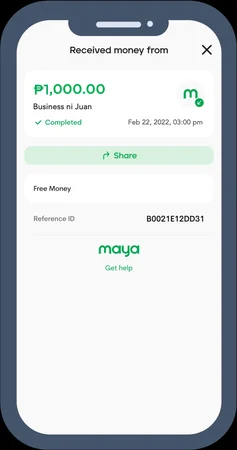
Cashing in with Maya at Jilino1 takes less than 30 seconds from start to finish. By harnessing Maya's native QR Ph scanning engine, payments authorize securely without typing complex bank account numbers. This tutorial covers the exact steps to fund your balance, locate your reference number, and ensure uninterrupted play.
Setting Up Your Maya Wallet for Instant Gaming Transfers
Before depositing, confirm that your Maya wallet is adequately funded. You can top up your Maya account via linked BPI/BDO bank accounts, 7-Eleven Cliqq kiosks, or over-the-counter channels. Upgrading your Maya account with a valid Philippine government ID (such as PhilSys National ID or UMID) increases your wallet limit and ensures seamless transactions.
The QR Ph Scan Process Inside the Maya Application
In the Jilino1 Cashier, select Maya and enter your deposit denomination (₱100 to ₱50,000). A dynamic QR Ph code displays on screen. Take a screenshot or tap save. Open Maya, tap 'Scan to Pay' from the main dashboard, tap the gallery icon in the top right corner, and select the QR image. Maya automatically decodes the payment details, letting you confirm with one tap.
Verifying Your Transaction via Maya Activity History
Once confirmed, Maya displays a green payment success checkmark and provides an official Reference Number (beginning with 'REF-'). This receipt is permanently stored under the 'Activity' tab in your Maya app. Keep this reference handy as official proof of payment in the rare event of telco communication lag.
Maya Cash-In Troubleshooting Guide
| Symptom / Message | Underlying Cause | Resolution Step |
|---|---|---|
| 'QR Code Invalid / Expired' | Code session timed out after 5 minutes | Refresh cashier page to generate a fresh QR Ph code |
| 'Transaction Limit Exceeded' | Maya monthly incoming/outgoing cap hit | Upgrade Maya account level or switch to GCash |
| Balance Not Updated in 60s | Carrier SMS webhook delay | Submit Maya Reference ID to 24/7 Live Support for instant manual credit |
| App Freezes on Upload | Low phone memory / permissions denied | Allow Maya camera/storage permissions in phone settings |
How to Complete a Maya Cash-In
Generate Deposit QR
In Jilino1 Cashier, select Maya, enter ₱100 or more, and screenshot the QR Ph code.
Open Maya 'Scan to Pay'
Launch Maya, tap Scan to Pay, choose the QR screenshot from your photo album, and authorize.
Start Playing
Return to Jilino1; your balance updates in seconds with zero service fees.
Related Cashier & Payments Guides
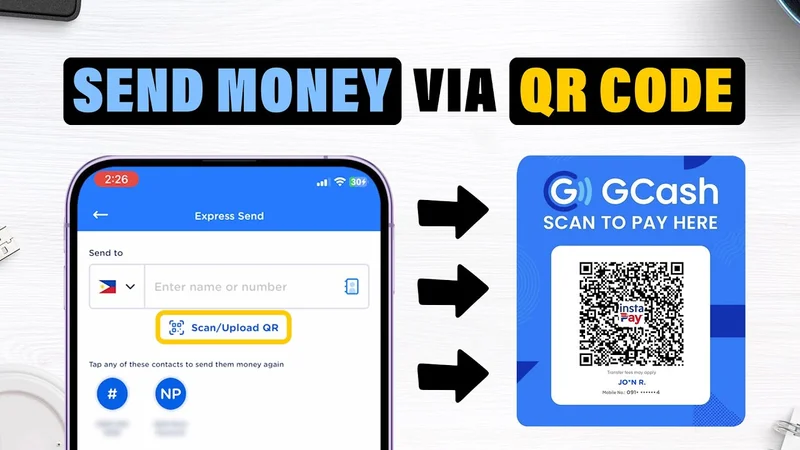
GCash Casino Philippines: Instant Deposits & 15-Minute Withdrawals
Play casino with GCash in the Philippines. Instant deposits from ₱100, QR Ph scanning, sub-15 minute...
View Guide ›How to Deposit with GCash: Step-by-Step Walkthrough & Guide
Complete walkthrough on depositing money via GCash at Jilino1. QR code scanning, manual transfer tip...
View Guide ›How to Withdraw to GCash: Fast Cashout Guide & Limits
Step-by-step guide to withdrawing casino winnings to GCash. Sub-15 minute cashouts, daily withdrawal...
View Guide ›Maya Casino Philippines: Instant Deposits & High-Limit Cashouts
Play online casino with Maya (PayMaya) in the Philippines. High transaction limits, fast QR Ph depos...
View Guide ›⚠️ Responsible Gaming Commitment (Strictly 21+ Only)
Jilino1 strictly enforces responsible gaming protocols in accordance with PAGCOR standards. Online gambling is exclusively intended for paid leisure entertainment. Never gamble with money needed for living essentials. Set daily deposit limits and mandatory session cooling-off periods.
Philippine Player Support Helplines:
- 📞 PAGCOR Responsible Gaming Helpline: (02) 8521-1551
- 🌐 National Council on Problem Gambling Philippines: Dedicated confidential support
- 🤝 Gamblers Anonymous Philippines: Community recovery fellowship
Frequently Asked Questions (PAA)
How fast does money reflect after depositing via Maya?
Funds reflect in your gaming balance within 10 to 15 seconds after confirmation in Maya.
What is the minimum cash-in amount for Maya?
The minimum cash-in is ₱100.00 PHP.
Can I use Maya to deposit from my credit card?
If your credit card is linked to your Maya wallet, you can cash in through Maya's standard payment flow.
Does Jilino1 charge fees for Maya deposits?
No. Jilino1 never charges fees for deposits made via Maya.
What should I do if my deposit is delayed?
Provide the 12-digit Maya Reference Number to our 24/7 live chat team for instant manual verification.
Experience the #1 Digital Casino in the Philippines
Sign up in 30 seconds. Deposit via instant GCash or Maya and claim your Free ₱100 Welcome Match plus daily unlimited rebates on 500+ verified JILI slots!